
Android as Raspberry Pi alternative gains traction with new
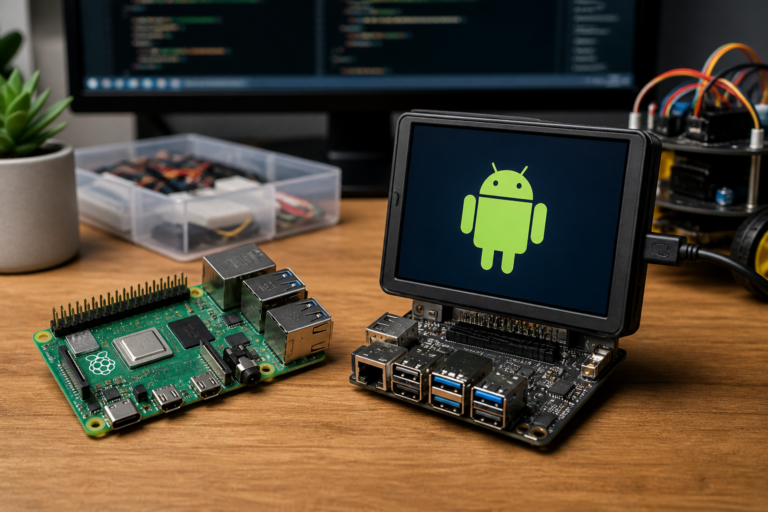
Android as Raspberry Pi alternative is the focus of this technology-news update.
You can turn an old Android into a Raspberry Pi alternative — but know this first
As Raspberry Pi prices rise amid global component shortages and heightened demand, an intriguing alternative is gaining attention: repurposing old Android devices as Raspberry Pi alternative hardware. This approach appeals to makers, educators, and developers who seek affordable, compact computing platforms without the cost or wait associated with traditional single-board computers. However, while converting an Android phone or tablet for DIY computing projects shows promise, there are important factors to consider before proceeding.
Repurposing Old Android Devices into Miniature Computers
Advances in software and community initiatives have made it possible for Android devices to function similarly to Raspberry Pi systems, effectively turning them into versatile, portable computing units. By leveraging the processing power, built-in displays, and connectivity options of smartphones and tablets, users can create setups suitable for media centers, lightweight servers, and educational tools.
Key technologies enabling this conversion include custom Android-based operating environments, Linux emulators, and remote desktop solutions. For instance, applications that run Linux distributions on top of Android or firmware modifications that allow installation of alternative OS images enable users to utilize the device’s hardware beyond its original mobile purpose.
Common use cases encompass:
– Media playback and streaming via connected HDMI outputs
– Hosting lightweight web servers or network-attached storage (NAS) services
– Providing educational coding and development platforms
– Serving as IoT gateways or lightweight automation hubs
How the Android as Raspberry Pi Alternative Setup Works
Hardware Compatibility and Requirements
Not all Android devices are equally suited for this kind of repurposing. Ideal candidates generally feature:
– Decent processing power, preferably with multi-core CPUs
– At least 2GB of RAM to support Linux environments effectively
– USB OTG (On-The-Go) support for connecting peripherals such as keyboards, mice, and external storage
– HDMI output capabilities—either native or via adapters—to connect to external displays
– Sufficient battery life or reliable power supply options for continuous use
Older devices with limited RAM or outdated processors may not provide an optimal experience. Connectivity features like Bluetooth, Wi-Fi, and Ethernet (often via adapters) also impact the range of feasible applications.
Software and Operating Systems
On the software side, users can either run Linux distributions atop Android or replace Android entirely. Common approaches include:
– Linux Deploy: An app that installs Linux distributions (Ubuntu, Debian, etc.) inside Android using a chroot environment, allowing Linux to run alongside Android without modifying the device firmware
– UserLAnd: Another app-based solution that enables running full Linux distributions with graphical interfaces on Android, suitable for development and lightweight server tasks
– Custom ROMs and Firmware: For advanced users, flashing custom ROMs that support native Linux or dual-boot setups can unlock additional capabilities but require technical expertise
Installation generally involves enabling developer options on the Android device, configuring the Linux environment through apps, and connecting peripherals. Essential configuration steps include setting up VNC servers for remote desktop access, mounting external storage, and installing necessary software packages based on the intended use.
Benefits and Impact on Users and Businesses
For hobbyists and educators, repurposing Android devices as Raspberry Pi alternatives offers a cost-effective way to explore computing and programming without purchasing new hardware. It also supports sustainability by extending the useful life of outdated smartphones and tablets.
Developers may benefit from the portability and integrated networking features of Android devices, facilitating rapid prototyping or deployment of lightweight applications. Small businesses and makerspaces might find value in low-cost media servers, digital signage, or IoT gateways built from repurposed Android hardware, reducing capital expenditure and e-waste.
Comparing Android Devices and Raspberry Pi
While Android devices can approximate some Raspberry Pi functions, notable differences remain:
– Performance: Smartphones often feature more powerful CPUs and integrated GPUs than some Raspberry Pi models, which can enhance multimedia and general computing performance
– Hardware Interfaces: Raspberry Pi offers extensive GPIO pins and hardware interfaces essential for electronics projects and IoT prototyping; Android devices generally lack these
– Expandability: Raspberry Pi supports a broad ecosystem of HATs, sensors, and accessories, whereas Android devices are limited to USB peripherals and adapters
– Software Flexibility: Raspberry Pi runs native Linux distributions designed for ARM architectures; Android devices rely on layered or emulated Linux environments, adding complexity
– Cost and Availability: Due to supply constraints, Raspberry Pi prices have increased, making free or low-cost repurposed Android devices attractive alternatives if suitable hardware is available
Selecting between the two depends on project requirements. For media consumption or lightweight server tasks, Android devices may suffice. For electronics prototyping or projects requiring GPIO access, Raspberry Pi remains the superior choice.
Limitations and Challenges to Consider
The Android-as-Raspberry-Pi-alternative approach has several challenges:
– Compatibility Issues: Not all Android hardware supports necessary peripherals or software environments. Devices lacking OTG or HDMI output face usability limitations
– Limited GPIO and Hardware Control: Unlike Raspberry Pi’s dedicated pins, Android devices do not expose low-level interfaces for direct hardware manipulation, restricting certain DIY electronics projects
– Performance Constraints: Older Android devices may struggle with multitasking or running heavier Linux applications smoothly
– Security and Updates: Outdated Android versions can expose users to security vulnerabilities, and Linux environments running atop Android may not receive timely patches
– Technical Complexity: Setting up Linux on Android and configuring peripherals requires technical knowledge, which may deter novices
You can turn an old Android into a Raspberry Pi alternative — but know this first: Practical Advice
Before starting this repurposing project, consider the following:
– Set Realistic Expectations: Repurposed Android devices will not fully replicate Raspberry Pi capabilities, especially regarding hardware interfacing
– Check Hardware Compatibility: Confirm your device supports required features like USB OTG and HDMI output before investing time
– Prepare for Technical Challenges: Installation and configuration are non-trivial; be ready to troubleshoot and consult community resources
– Security Awareness: Keep your device’s software updated as much as possible and isolate repurposed systems from sensitive networks if security is a concern
– Backup Original Data: Preserve personal data before modifying device software
What this means: Key Takeaways
– Repurposing old Android devices provides a sustainable, cost-effective alternative for certain computing projects
– Software solutions exist to run Linux environments on Android, but full Raspberry Pi functionality remains limited
– Hardware constraints such as lack of GPIO and limited peripheral support restrict some IoT and electronics prototyping applications
– Users must weigh trade-offs between cost, performance, and project requirements when considering Android as Raspberry Pi alternative hardware
Looking Ahead: Future Developments and Trends
Community-driven projects continue to improve the viability of using Android devices as Raspberry Pi alternatives. Emerging tools aim to simplify Linux deployment on Android and enhance hardware compatibility. Future possibilities include specialized hardware adapters to expand peripheral support and optimized OS images tailored for repurposed devices.
This trend aligns with broader movements in DIY computing and electronic recycling, promoting environmental sustainability and democratizing access to computing resources. As software support matures and awareness grows, repurposing Android devices in this way may become more accessible and practical for a wider audience.
Conclusion
You can turn an old Android into a Raspberry Pi alternative — but know this first. While this concept offers opportunities to extend the life of aging hardware and reduce costs, it is not a straightforward replacement. Users must navigate technical, hardware, and security limitations, balancing expectations against the convenience and affordability of repurposed Android devices. Monitoring developments in software tools and community resources will be essential for those interested in exploring this creative computing approach.
Frequently Asked Questions
What does it mean to turn an old Android device into a Raspberry Pi alternative?
It means repurposing an Android smartphone or tablet to function similarly to a Raspberry Pi by running Linux-based operating systems or software typically used on Raspberry Pi devices.
Who can benefit from using an old Android device as a Raspberry Pi alternative?
Hobbyists, educators, and developers looking for a cost-effective or readily available hardware option for Linux projects can benefit, especially if they already have an old Android device.
Are there any compatibility issues when using an Android device instead of a Raspberry Pi?
Yes, Android devices have different hardware architectures and limited GPIO pin access compared to Raspberry Pi, which can restrict certain hardware projects and peripherals.
Is using an old Android device for this purpose cost-effective?
Yes, reusing an existing Android device can save money compared to buying a Raspberry Pi, but additional costs may arise if adapters or specific software are needed.
What privacy or security considerations should be kept in mind?
Ensure that the Android device's firmware is up to date, and be aware that repurposed devices may lack the security features and support updates that Raspberry Pi hardware and software typically receive.
Source: Original reporting

Leave a Reply