
Google Photos shimmer disable option now available to users
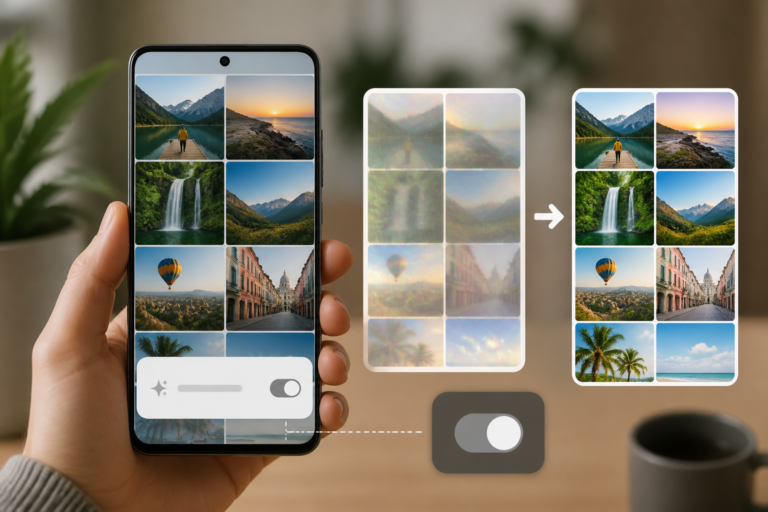
Google Photos shimmer disable is the focus of this technology-news update.
Google Photos Adds Setting to Disable Shimmer, AI Camera Shortcut
Google Photos remains one of the most widely used photo management and storage apps globally, serving millions of users. Responding to user feedback, the latest update introduces new customization options, including a setting to disable the “shimmer” effect and the ability to turn off the AI camera shortcut. This change reflects Google’s recognition of users’ desire for greater control over AI-driven interface elements and marks a shift toward enhanced personalization within the app. The addition of the shimmer disable setting represents a meaningful step in balancing advanced features with user comfort.
New Customization Settings in Google Photos
The Android version of Google Photos has rolled out several minor yet impactful updates, with the key additions being the option to disable the shimmer effect—a visual animation that highlights specific UI elements—and the ability to remove the AI camera shortcut from the app interface. This shortcut previously appeared as a dedicated button for quick access to AI-powered camera features. These updates are part of a gradual rollout and are accessible through a standard app update via the Google Play Store.
By introducing these toggles, Google allows users to customize their app experience to reduce distractions and streamline interactions. This update aligns with a broader trend toward offering users more granular control over AI-driven features.
What Is the Shimmer Effect and AI Camera Shortcut?
The shimmer effect in Google Photos is a brief animation or glow designed to draw attention to new features, notifications, or interactive elements within the app. Its main purpose is to guide users toward enhancements or tools, especially AI-assisted capabilities. While intended to improve discoverability, some users find the shimmer effect distracting or visually overwhelming over time.
The AI camera shortcut is a dedicated button integrated into the app’s interface that provides quick access to Google’s AI-powered camera functions. These functions typically include scene optimization, automatic enhancements, or creative AI filters intended to improve photo quality. Although convenient for some users, others may consider the shortcut unnecessary clutter, particularly if they prefer manual control or seldom use AI camera enhancements.
How to Disable the Shimmer Effect and AI Camera Shortcut
With the latest update, Google Photos users on Android can disable both the shimmer effect and AI camera shortcut through the app’s settings menu. The process is straightforward:
1. Open the Google Photos app on an Android device.
2. Tap the profile icon in the top right corner to access settings.
3. Select “Photos settings” from the dropdown menu.
4. Locate the new toggles labeled “Disable shimmer effect” and “Hide AI camera shortcut.”
5. Enable these options to disable the respective features.
Once activated, shimmer animations will no longer appear, and the AI camera shortcut will be removed from the main interface, resulting in a cleaner, less animated experience. Although Google has not provided official screenshots in the update announcement, users report that these toggles are clearly marked within the settings, emphasizing ease of access.
Benefits and User Impact of Disabling Shimmer and AI Camera Shortcut
Allowing users to turn off the shimmer effect and AI camera shortcut offers several practical benefits:
– Reduced Visual Distractions: Removing shimmer animations creates a calmer interface preferred by some users.
– Improved App Responsiveness: Disabling animations can enhance performance, especially on lower-end or older devices where such effects may cause lag.
– Customizable Experience: Users gain control over which AI-driven features are readily accessible, tailoring the app to their habits.
– Enhanced Privacy Considerations: While the AI camera shortcut itself is not a privacy risk, reducing exposure to AI features may ease concerns among users wary of automated data processing.
Some users may disable these features to streamline their workflow or because they prefer manual photo editing and find AI prompts intrusive. This update addresses longstanding requests from users seeking a more minimalist interface.
Google Photos Shimmer Disable: Comparison with Other Photo Apps
The addition of a Google Photos shimmer disable setting aligns with a wider industry trend toward granting users more autonomy over AI features in consumer applications. Competing photo management and camera apps, such as Apple Photos and Adobe Lightroom, have also begun offering toggles to customize AI suggestions and interface animations.
For example, Apple Photos allows users to control on-device machine learning features and notifications, while Adobe Lightroom offers detailed preferences for automatic enhancements. Google’s approach reflects these trends by acknowledging varying user comfort levels with AI-driven UI elements.
This evolution indicates a growing recognition that, while AI can enhance usability, it should not come at the expense of user control or accessibility. By enabling users to disable shimmer and the AI camera shortcut, Google Photos strengthens its position as a customizable and user-friendly platform.
Limitations and Future Considerations
Despite these improvements, the new settings have limitations. Currently, the shimmer disable toggle and AI camera shortcut removal are available only on Android devices, with no confirmed timeline for iOS support. Additionally, these toggles affect only visual and shortcut elements and may not disable all AI-driven notifications or prompts within the app.
It remains uncertain whether Google plans to expand customization options to other AI features or introduce more nuanced controls beyond simple on/off toggles. The impact of these changes on the effectiveness of AI suggestions and the overall app experience has yet to be fully assessed.
Google has not publicly detailed its roadmap for further AI feature adjustments or additional user feedback mechanisms related to these updates, leaving some questions open about the long-term direction of AI integration in Google Photos.
Looking Ahead: The Future of AI and Customization in Google Photos
As AI continues to play a central role in photo management, Google is likely to prioritize user customization to maintain engagement and satisfaction. The introduction of the shimmer disable setting signals a willingness to listen to users and adapt accordingly.
Future updates may introduce more refined options, such as selective AI feature toggles, enhanced privacy controls, and adaptive UI elements responsive to individual user habits. Google might also extend these settings to other platforms, including iOS and web versions of Photos.
User feedback will be crucial in shaping these developments. Google typically collects input through app reviews, beta testing programs, and surveys, though details regarding feedback on these particular features have not been disclosed.
Ultimately, balancing AI innovation with user control will remain a key challenge for Google Photos and similar apps navigating the complexities of automated assistance in everyday digital tools.
Key Takeaways
– Google Photos has introduced new toggles allowing users to disable the shimmer effect and AI camera shortcut.
– The shimmer disable setting helps reduce visual distractions and simplify the interface.
– These updates enhance customization, responding to user demand for control over AI-driven UI elements.
– The features are currently exclusive to Android, with no confirmed iOS availability.
– This move aligns with broader industry trends toward user empowerment in managing AI features.
Conclusion
The recent update adding settings to disable shimmer and the AI camera shortcut marks a subtle yet significant shift in how Google Photos balances AI-powered innovation with user autonomy. By allowing users to turn off eye-catching animations and opt out of AI camera shortcuts, Google addresses diverse preferences and improves accessibility. Although these changes are currently limited to Android and do not cover all AI features, they demonstrate a growing emphasis on personalization and user comfort.
As AI integration in photo apps continues to evolve, observing how Google and its competitors refine customization options will be important for both users and developers. The success of these features depends on offering meaningful choices without compromising the convenience and enhancements AI offers. For now, Google Photos users can expect a cleaner, more tailored experience, with the possibility that their feedback will influence future AI developments in the app.
Frequently Asked Questions
What new setting has Google Photos added related to the shimmer effect?
Google Photos has introduced a setting that allows users to disable the shimmer effect, which is an animation used in the app's interface.
What is the AI camera shortcut in Google Photos, and what change was made?
The AI camera shortcut is a quick access feature to Google's AI-powered camera tools, and Google Photos now offers an option to disable this shortcut from the interface.
Who can access the new settings to disable shimmer and the AI camera shortcut in Google Photos?
These new settings are available to Google Photos users on supported devices as part of a recent app update, typically on Android and iOS platforms.
Does disabling the shimmer effect or AI camera shortcut affect photo quality or app functionality?
No, disabling these features only changes the user interface experience and does not impact photo quality or core app functions.
Are there any privacy or security concerns related to the AI camera shortcut in Google Photos?
No new privacy or security issues have been reported with the AI camera shortcut; it uses on-device AI features and respects Google's standard privacy policies.
Source: Original reporting

Leave a Reply