
Microsoft PowerToys Alt Tab shortcut adds customizable windo
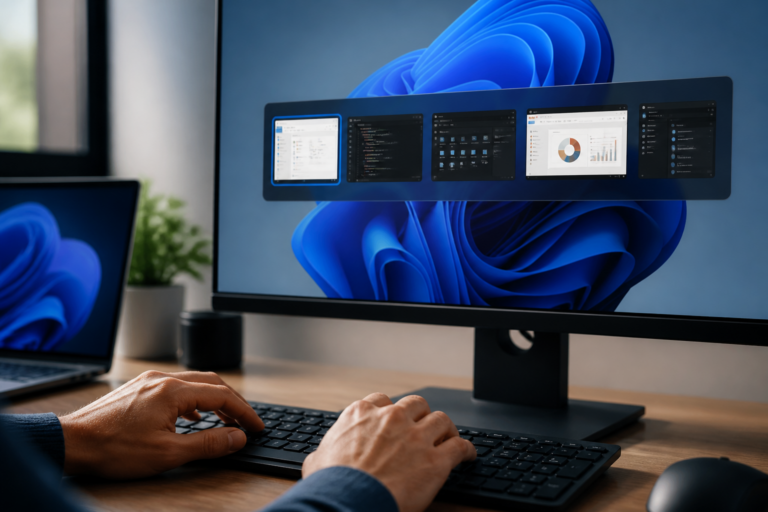
Microsoft PowerToys Alt Tab shortcut is the focus of this technology-news update.
Microsoft’s New PowerToys Shortcut Lets You Alt+Tab Within a Single App
Microsoft PowerToys has long been a popular toolkit among Windows users aiming to enhance productivity through custom utilities and shortcuts. The latest addition to this suite addresses a common challenge: managing multiple windows of the same application. Called Window Hopper, this new PowerToys Alt Tab shortcut enables users to cycle exclusively through open windows within a single app, simplifying multitasking when several instances of the same program are active.
Introduction: Why This PowerToys Update Matters
The classic Alt+Tab shortcut remains a cornerstone of window navigation in Windows, allowing users to switch between open applications and windows. However, when many windows are open, especially multiple instances of the same app, this method can become inefficient. This scenario frequently arises in workflows involving web browsers, File Explorer, or office productivity software with numerous documents or tabs open simultaneously. Microsoft’s new PowerToys shortcut lets you Alt+Tab within a single app, directly addressing this issue by limiting the switcher’s scope to windows of the current application only.
By narrowing the focus, this targeted navigation reduces the number of keystrokes needed to locate the desired window, improving workflow fluidity and minimizing distractions. For professionals and power users who handle numerous windows daily, this feature offers a meaningful boost to task management and interaction speed.
What Happened: The Introduction of the New PowerToys Shortcut
The Window Hopper shortcut was introduced in a recent PowerToys update among several incremental improvements. It allows users to cycle solely through windows belonging to the active application using a modified Alt+Tab command. For example, if multiple File Explorer windows or browser sessions are open, this shortcut lets users toggle between them without cycling through unrelated apps.
Although detailed in the PowerToys release notes, some users—including early testers—report that the feature does not appear in all installations despite updating to the latest version. This suggests Microsoft may be rolling it out gradually or restricting it to users enrolled in the new Insider update channel, which PowerToys now supports to provide earlier access to experimental features.
Key Details of the Alt+Tab Within Single App Shortcut
Window Hopper differs from the traditional Alt+Tab by filtering the windows it cycles through to those belonging exclusively to the current application. Unlike the standard behavior, which includes all open windows from all apps, this approach avoids clutter and reduces the overload often experienced when many programs run simultaneously.
Currently, Window Hopper works with standard windows such as File Explorer and web browsers, where multiple instances are common. While Microsoft has not publicly disclosed the technical details, it likely uses PowerToys’ integration with Windows APIs to identify and enumerate windows belonging to the focused app.
By default, the shortcut is triggered by pressing Alt together with the backtick key (`), a key that some users may find unfamiliar or inconvenient. However, PowerToys supports shortcut customization, allowing users to remap the command to more familiar key combinations if preferred.
Impact on Users, Businesses, and Developers
This PowerToys Alt Tab shortcut offers several benefits to individuals and organizations:
– Enhanced Productivity: Users can switch between related windows more swiftly, reducing time spent navigating unrelated windows.
– Improved Focus: Limiting navigation to a single app minimizes cognitive overload caused by a crowded Alt+Tab interface.
– Professional Use Cases: In workflows requiring multitasking across numerous documents or projects—such as software development, content creation, or administration—the shortcut streamlines window navigation.
– Developer Considerations: The feature encourages application developers to maintain clear window identities and consistent window management, promoting compatibility and a smooth user experience.
Microsoft’s New PowerToys Shortcut Lets You Alt+Tab Within a Single App: A Closer Look
Once enabled and configured, using Window Hopper is straightforward:
1. Open multiple windows of a single application—for example, three browser windows or several File Explorer instances.
2. Press the designated shortcut (default: Alt + backtick) to cycle through only those windows belonging to the active app.
3. The window switcher highlights only the windows from that application, enabling rapid selection.
4. Release the keys to focus the chosen window.
This contrasts with the traditional Alt+Tab interface, which displays all open windows across all applications, often requiring multiple keypresses to access windows of the same app. While tools like Windows Task View or virtual desktops offer broader window management, they do not provide this focused intra-app switching capability.
Comparison with Other Window Switching Methods
– Task View: Displays thumbnails of all open windows and virtual desktops but is less efficient for cycling through multiple windows of the same app.
– Virtual Desktops: Organizes windows across different desktops but does not streamline switching within a single application.
– Third-Party Tools: Programs like Stardock’s AltTabby offer customizable window switchers; however, Window Hopper is integrated directly into PowerToys and the Microsoft ecosystem.
Comparison and Context: How This Feature Fits into the Windows Ecosystem
Microsoft continues to enhance multitasking features in Windows, with PowerToys often serving as a testing ground for experimental utilities. Window Hopper complements native tools such as Snap Layouts and Task View by addressing a specific yet common need: navigating multiple windows within the same application.
Other PowerToys utilities, like PowerDisplay for linked monitor controls and Mouse Highlighter for enhanced pointer visibility, similarly focus on improving user efficiency and experience. The introduction of an Insider channel for PowerToys updates indicates Microsoft’s intent to engage power users more closely, though this approach may result in staggered feature availability.
Limitations and Unknowns
Despite its promise, the new PowerToys Alt Tab shortcut has some limitations and unanswered questions:
– Availability: The feature is not yet universally accessible, even with the latest PowerToys version; it may require enrollment in the Insider channel.
– Shortcut Familiarity: The default use of the backtick key may confuse some users, making manual remapping necessary for wider adoption.
– App Compatibility: While compatible with standard windows, it remains unclear how well Window Hopper handles specialized or non-standard applications, such as UWP apps or complex tabbed interfaces.
– Customization Scope: Details on further customization options for shortcut behavior or interface remain limited at this stage.
What Happens Next: Future of PowerToys and Multitasking Features in Windows
Microsoft’s PowerToys roadmap and community discussions indicate ongoing development of Window Hopper and related multitasking tools. Users interested in early access can switch to the Insider update channel within PowerToys settings, though this may involve trade-offs in stability.
There is potential for features pioneered by PowerToys—including intra-app window switching—to be integrated into the core Windows operating system in future updates, depending on user feedback and adoption. As Windows evolves, productivity enhancements will continue to be a focus, especially for power users and professionals.
Users can contribute to PowerToys development by submitting feedback through official Microsoft channels and GitHub, where the PowerToys team actively manages feature requests and bug reports.
Key Takeaways
– Microsoft PowerToys’ Window Hopper shortcut enables cycling through open windows within a single application, enhancing navigation efficiency.
– The shortcut defaults to Alt + backtick but supports customization.
– Window Hopper is not yet widely available and may require opting into the PowerToys Insider update channel.
– This feature complements existing multitasking tools like Task View and Snap Layouts by focusing on a specific, common user need.
– Further development and possible integration into Windows depend on user adoption and feedback.
Conclusion
Microsoft’s new PowerToys shortcut lets you Alt+Tab within a single app, providing a practical solution for users who find the traditional Alt+Tab interface cumbersome when managing multiple windows of the same application. Although its rollout remains partial and some usability aspects require refinement, the feature demonstrates Microsoft’s ongoing commitment to improving Windows productivity through PowerToys. Users who frequently manage multiple windows within apps should monitor this development and consider joining the Insider channel to test it as it evolves. Future updates may further refine this shortcut and potentially incorporate it into mainstream Windows functionality, making multitasking more seamless for a wide range of users.
Frequently Asked Questions
What is the new PowerToys shortcut introduced by Microsoft for Alt+Tab functionality?
Microsoft's PowerToys now includes a shortcut that allows users to Alt+Tab between open windows within a single application, enhancing window management and multitasking.
Who can use the new Alt+Tab within-app shortcut feature in PowerToys?
The feature is available to users who have installed the latest version of Microsoft PowerToys on Windows 10 or Windows 11.
Is the new Alt+Tab within-app shortcut feature in PowerToys free to use?
Yes, Microsoft PowerToys is a free, open-source utility, and this new shortcut feature is included at no additional cost.
Are there any compatibility requirements for using this PowerToys shortcut?
The feature requires Windows 10 or Windows 11 and the latest PowerToys release; older Windows versions or outdated PowerToys may not support it.
Does using the PowerToys Alt+Tab within-app shortcut affect user privacy or security?
No, PowerToys operates locally on the user's device and does not transmit data externally, so this shortcut does not pose additional privacy or security risks.
Source: Original reporting

Leave a Reply